· Matthew Kuntz · Technical Details · 5 min read
Stitch Workflow's technical details of implementing SOC2 controls
Learn how we managed and implemented our SOC2 journey
A technical breakdown of our Compliance Journey
As a fairly new company, we knew we needed to have a solid security story, and we chose SOC2 Type II as our initial Audit to help prove ourselves to our customers and show that we are prepared to treat their data with the care it deserves.
We started by using an SSO provider for every system we use. We decided to use Google Workspace, after looking at Okta but deciding it was slightly overkill for a small team of our size. Every tool we use ties back to Google SSO, with required MFA and user roles.
We chose Secureframe as our Compliance Platform of choice, after research and demoing a few of the other platforms. We ended up really liking their price to feature ratio, as well as their willingness to help us set up the platform as a smaller team. It integrated with all of the tools we needed, and had a really nice Policy Editor to help with some of the more verbose requirements of documenting policies.
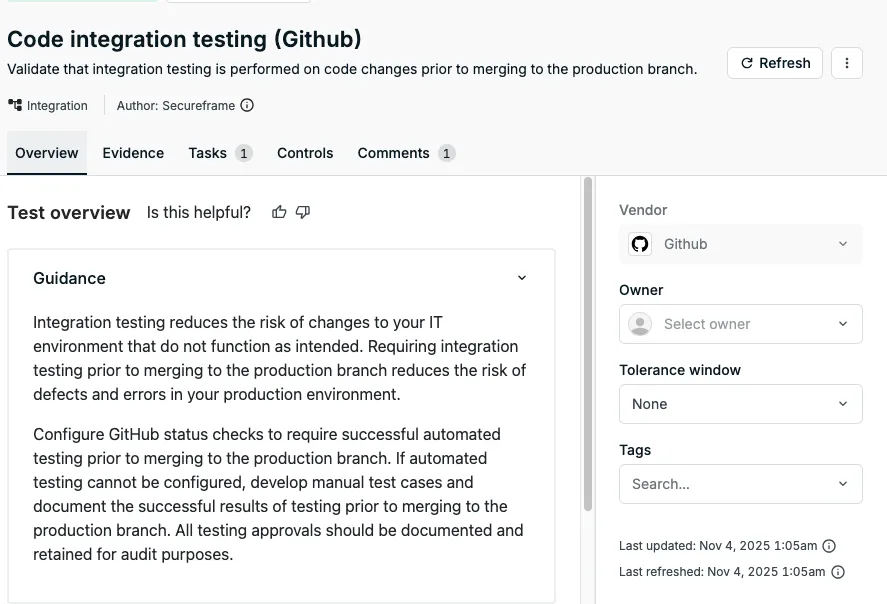
We configured our GitHub Organization with rulesets and best practices, requiring code reviews on every merge to main and ensuring each repository requires automated tests to pass. For this, we use a combination of GitHub Organization Rulesets and Secureframe checks ensuring each repository has valid automated tests on a PR merge.
We make use of Dependabot as well, to help keep code dependencies up to date, but for us this is less of a security choice and more of a code hygiene choice. After the issue earlier this year with a popular GitHub action being compromised and re-writing tags to the malicious version, we quickly ensured that all Actions we use have pinned SHAs instead of pointing to a version tag. As a side effect of this, we very closely inspect each Dependabot PR, checking all of the updated Repositories closely.
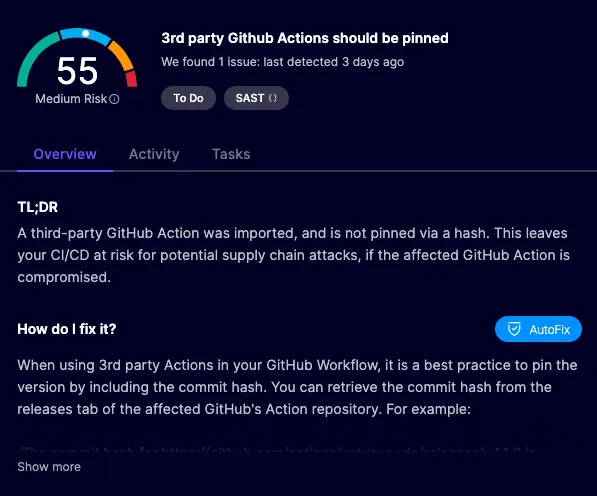
Dependabot does have some security checks built in to prioritize Security issues over just package version upgrades, but we had already adopted Aikido as our security platform of choice, and closely follow its issue feed for anything instead of using Dependabot directly for security issues in packages. Their SAST product really helps call out how things would impact us in real world cases, and their Web Scanning and Container Scanning are able to put all of the pieces together to indicate Severity.
Their Web Scanner also helped write our apps fairly aggressive Content Security Policy (CSP), which is in my opinion one of the best pieces of security on the modern web. We use a nonce on every script that we load, and pass that through our server-side front end framework, making sure we inject everything correctly. We limit third party scripts, essentially only allowing Stripe components and Google Fonts.
import { randomBytes } from "node:crypto";
const cspNonce = randomBytes(32).toString("base64");
// returning headers on each request, a subset of the entire Content-Security-Policy header
[`script-src 'strict-dynamic' 'nonce-${cspNonce}'`];
// Later in our React framework code, we make sure to pass the nonce to each injected Script
export function ScriptsWithNonce({ nonce }: { nonce: string }) {
  return (
    <>{Scripts().map((child: JSX.Element) => cloneElement(child, { nonce }))}</>
  );
}
// ensuring each Script and Link tag in the HTML has the correct nonce, indicating we added it.
// <script nonce="y6PeqlqCXc8BiqQM3vMKUU+1J9UFvMVwfK35NyCdNag=">
For our Infrastructure Security, it’s a pretty clean and simple story. We don’t currently provision any servers, so no patching and maintenance to worry about. Everything is handled by AWS Lambda and ECS Fargate. The main API runs as an ECS Fargate task behind a network load balancer, and that NLB is restricted to only allow traffic from Cloudflare, allowing our WAF to control all API traffic.
data "cloudflare_ip_ranges" "ips" {
  networks = "networks"
}

resource "aws_vpc_security_group_ingress_rule" "allow_tls_ipv4" {
  for_each = toset(data.cloudflare_ip_ranges.ips.ipv4_cidrs)

  security_group_id = aws_security_group.api.id
  cidr_ipv4         = each.value
  from_port         = 443
  ip_protocol       = "tcp"
  to_port           = 443
}
We also ran Intruder.io Scans for the duration of the Audit period, helping to ensure there were no misconfigurations or common OWASP vulnerabilities. When running the scan, we whitelist the IPs in Cloudflare, ensuring the Application itself is hardened and not just the WAF Rules.
A few other odds and ends:
- Doppler for secrets management - this is a powerful tool allowing us to make sure our Apps have secrets set correctly. It has a great UI for multiple environments, so if you add a new Secret in a testing environment you don’t forget to add it to production. It allows each developer to have a base “development” environment where they can override individual Secrets, like their own personal Stripe Sandbox for example. Doppler will sync the secrets to where they need to go, like AWS Secret Manager or Github Actions, so the app isn’t even aware of Doppler at all.
- Cloudflare I mentioned above the WAF rules, but we use lots of features worth mentioning. Cloudflare Workers is a big part of our web application, and Cloudflare R2 with Presigned URLs drives a lot of our customer file uploads. The ease of shipping web applications on Cloudflare is pretty amazing for our velocity, and Doppler helps tie it all together across all of the environments and micro web-apps.
- Linear - Ticketing app with strong Github and Sentry integrations, making it really easy to track all of the changes and link code changes to tickets.
- Tailscale “VPN” that allows remote access to Databases and other internal resources that don’t have any public IP addresses in AWS.
If you have any questions or comments, reach out to me on LinkedIn for more information!